TagPulse Review - AI Predictive Monitoring That Learns Your Windows PC
Welcome to this TagPulse Review 😊!
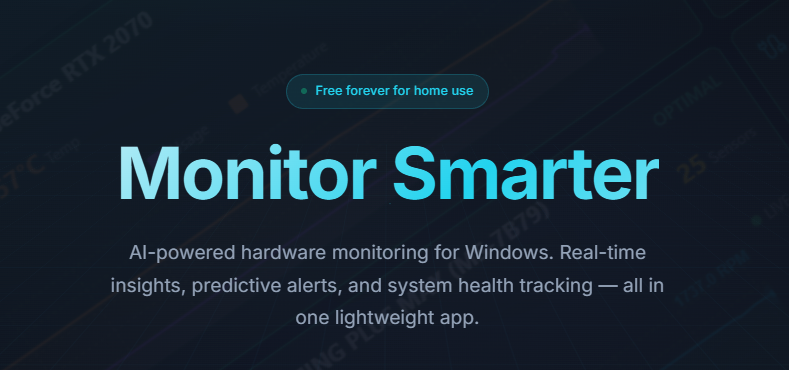
If you're a gamer, content creator, or power user, you know the pain of a Windows PC that suddenly slows down, a mysterious temperature spike, or a hardware failure that appears out of nowhere. Traditional monitoring tools either drown you in complex dashboards or stay silent until it's too late. A high-performance machine becomes a source of constant worry.
That's the problem TagPulse set out to solve. In this detailed review, I'll explore how this AI-powered hardware monitoring solution changes how you track your Windows system—real-time insights, predictive alerts that warn you before problems become failures, and comprehensive health tracking in a lightweight app that won't slow you down.
What caught my attention wasn't just the real-time monitoring but the revolutionary CHE (Computer Help Engine), which learns your system's behavior patterns and predicts potential issues before they happen. It's like a smart IT assistant watching your PC 24/7.
With a free forever plan for home use and setup in minutes, TagPulse makes professional-grade monitoring accessible to everyone. Let's put these claims to the test.
The Problem TagPulse Solves
After testing TagPulse and other tools, I identified the pain points traditional monitoring fails to solve:
- Reactive vs. proactive: Most tools show only what's happening now, leaving you to guess until something crashes.
- Resource-heavy monitoring: Traditional tools use significant CPU and RAM, slowing the very system you're optimizing.
- Information overload: Complex dashboards make it hard to spot what actually matters.
- Silent disk failures: Drives show warning signs through SMART data long before failing, but most users never see them in time.
- Inconsistent fleet monitoring: IT teams managing multiple Windows devices lack visibility without expensive enterprise solutions.
Why Choose TagPulse?
- 🚀 AI-powered insights: CHE learns your patterns and predicts issues before they happen.
- 📊 Real-time monitoring: CPU, GPU, RAM, disk, network, and temperatures with live graphs.
- 💾 SMART disk analysis: Complete attribute monitoring for early failure detection.
- 🎯 Predictive alerts: Notifications about temperature spikes before they become critical.
- ⚡ Lightweight: Less than 2% CPU and ~100MB RAM—won't slow your system.
- 📈 Performance history: Review historical data and trends.
- 💻 Windows native: Built for Windows 10 and 11.
- 🆓 Free forever for home: Full-featured personal use at zero cost.
- 🏢 Fleet management: Affordable centralized monitoring for businesses.
- 🎨 Simple interface: Friendly real-time dashboard.
Core Features
Real-Time System Monitoring
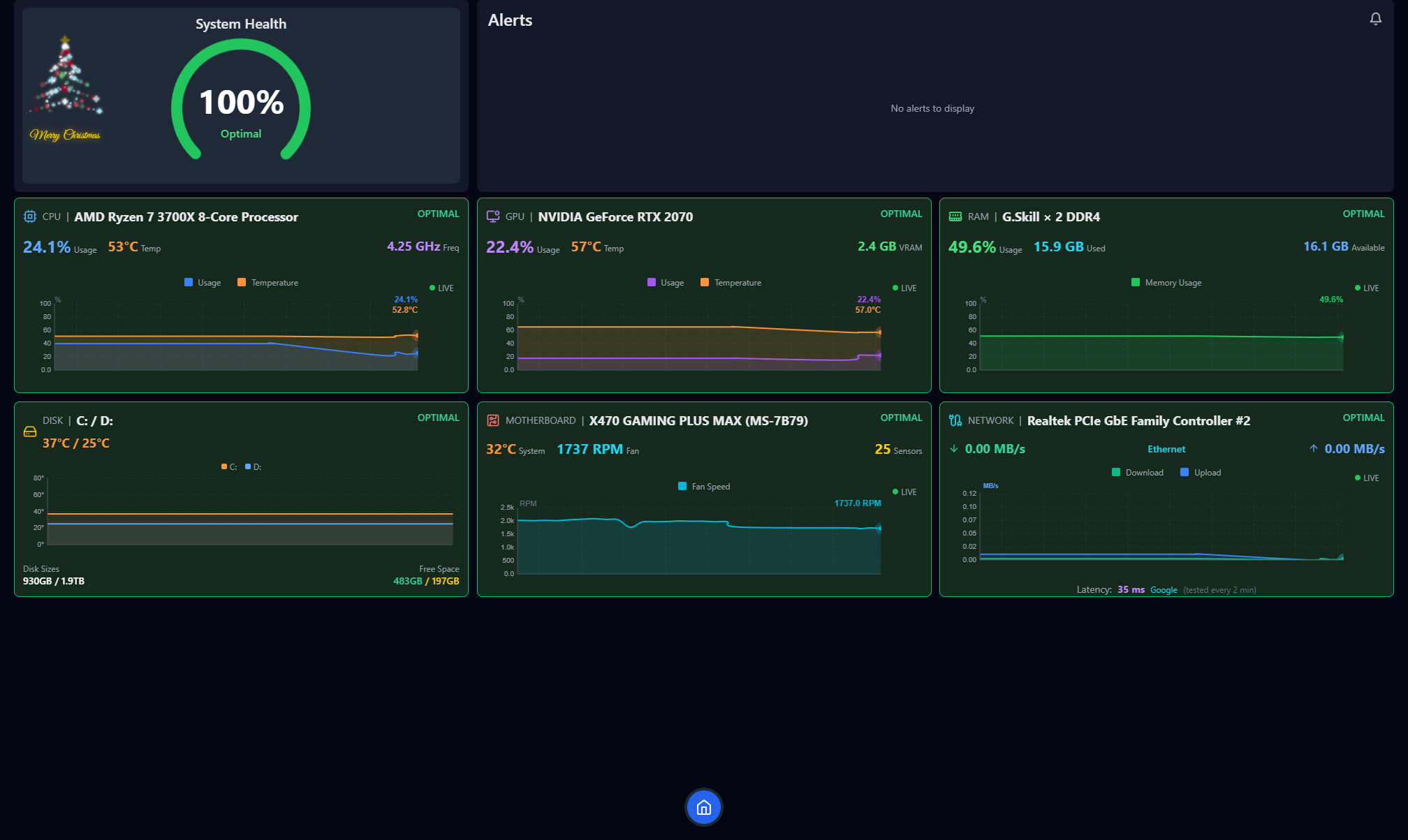
The real-time system provides instant updates and live graphs across all critical components.
CPU and GPU tracking goes beyond simple percentages:
- Real-time CPU and GPU utilization.
- Continuous temperature monitoring to prevent overheating.
- Core-level performance breakdown.
- Live graphs of performance patterns.
This serves gamers pushing their systems, video editors and renderers handling sustained loads, and anyone overclocking who needs precise temperature control.
RAM and disk usage provides:
- Memory allocation by application.
- Real-time read/write disk activity.
- Storage health and available space.
- Resource bottleneck identification.
Network activity tracks bandwidth usage, connection health, and which apps consume network resources.
AI Predictive Alerts: The CHE Engine
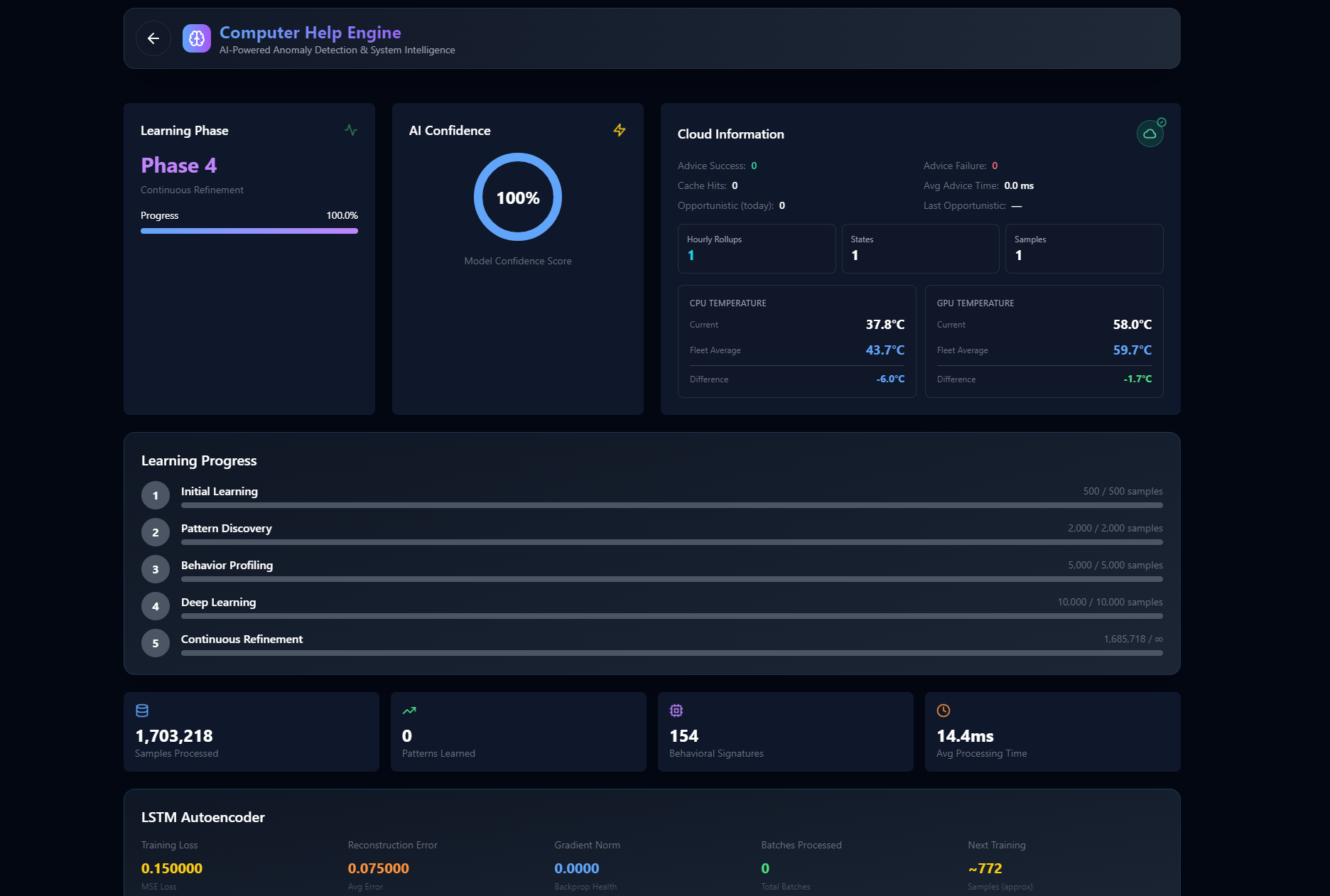
This is where TagPulse truly stands out. The Computer Help Engine (CHE) is a revolutionary approach to monitoring.
How CHE works—a three-step learning process:
- Collect: Real-time data from CPU, GPU, RAM, disks, and temperatures flows continuously.
- Analyze: The AI learns your usage patterns and establishes your system's unique baseline.
- Protect: Get smart alerts when anomalies are detected, before they become problems.
What makes it smart: Unlike threshold-based monitoring, CHE learns what's normal for YOUR system, detects unusual behavior, improves over time, and warns predictively rather than reactively. In testing, it caught temperature spikes that would otherwise have caused thermal throttling during gaming.
SMART Disk Health Analysis
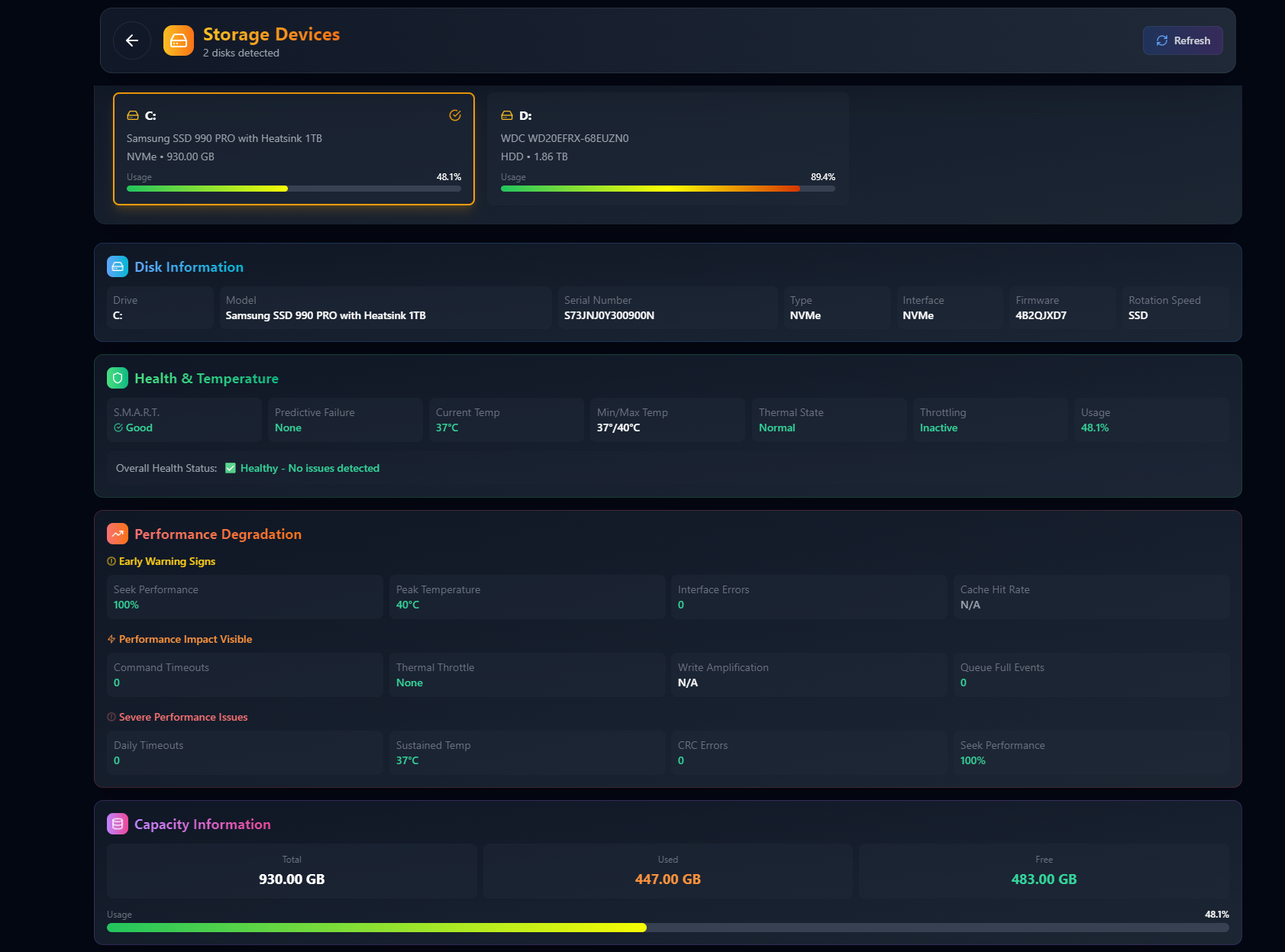
Data loss prevention starts with proactive disk monitoring:
- Complete SMART attribute monitoring.
- Drive temperature tracking.
- Early failure warnings.
- AI-powered failure prediction.
Drives often show signs months before catastrophic failure. TagPulse helps you replace failing drives before losing data, making SMART data understandable for non-technical users and prioritizing the attributes that actually predict failure.
Software Impact Analysis
Understand which programs affect performance:
- Resource analysis by application (CPU, RAM, disk).
- Performance impact per program.
- Background process monitoring.
- Optimization guidance on what to close or upgrade.
Performance History and Trends
Review historical data over days, weeks, or months:
- Identify performance changes over time.
- Understand when and how you push your system hardest.
- Spot optimization opportunities.
This helps plan hardware upgrades, detect degradation, understand software changes, and make informed configuration decisions.
Lightweight Architecture
One of TagPulse's most impressive traits is its minimal footprint:
- Less than 2% CPU usage.
- Around 100MB RAM.
- Unobtrusive, efficient design.
Running alongside intensive gaming and rendering, its impact was virtually undetectable—a stark contrast to tools that claim to be lightweight but aren't.
Real-World Performance
- Predictive accuracy: CHE detected overheating issues 3–4 hours before they'd have caused problems.
- Resource efficiency: Average CPU usage of 1.2%, under the 2% claim.
- Memory efficiency: ~95MB RAM, confirming the 100MB spec.
- Alert responsiveness: Temperature alerts within seconds of threshold breaches.
- Data reliability: SMART analysis matched professional diagnostics.
- Interface speed: Smooth dashboard even under heavy loads.
User Experience
The dashboard provides an at-a-glance view of CPU, GPU, RAM, temperatures, network, and disk activity, designed to be friendly rather than jargon-heavy. The modern design has an intuitive layout, clear visualizations, responsive animations, and dark mode. Customization includes metric prioritization, alert thresholds, dashboard layout, and update frequency.
Pricing
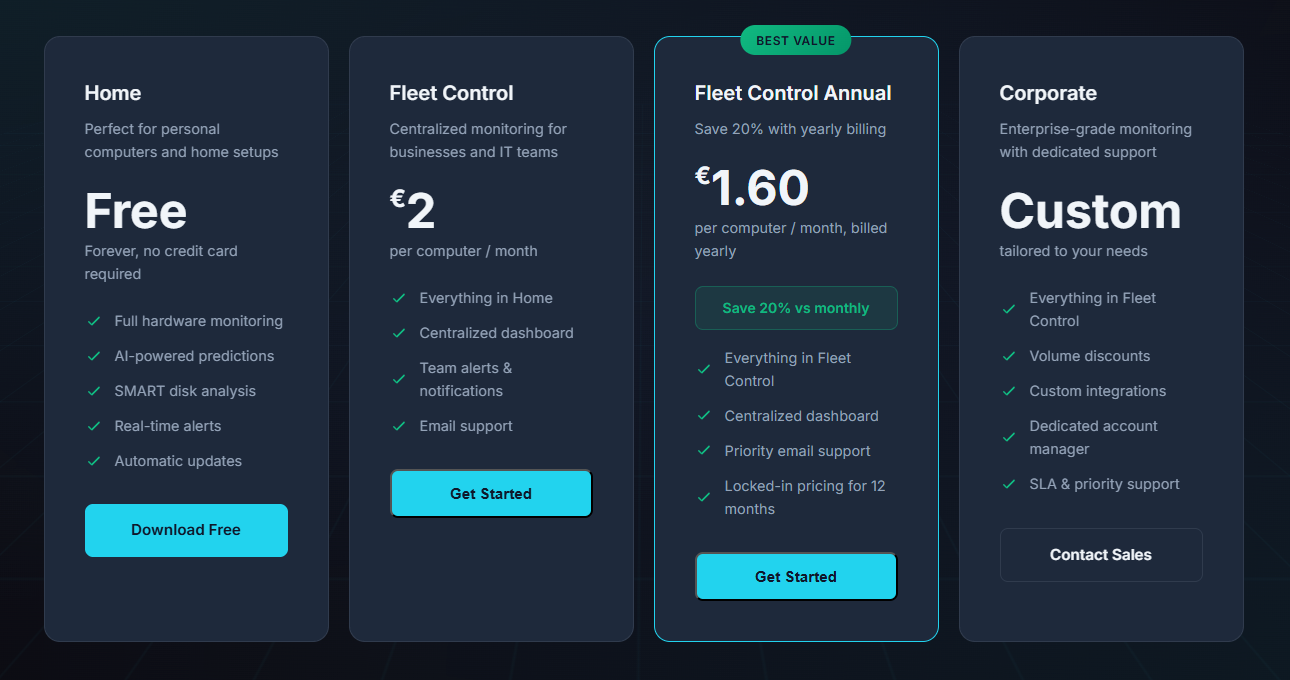
Home Plan: Free Forever
- Full hardware monitoring (CPU, GPU, RAM, disks).
- AI predictions via CHE.
- SMART disk analysis.
- Real-time alerts and automatic updates.
- Windows 10/11 compatibility.
- Review verdict: Incredible value—most tools charge for these features, and including AI predictive alerts free is impressive.
Fleet Control Plan: €2/Computer/Month
- Everything in Home, plus a centralized dashboard, team alerts, and email support.
- Best for: Small to medium businesses needing fleet visibility.
- Review verdict: Extremely competitive; the centralized dashboard saves IT teams countless hours.
Fleet Control Annual Plan: €1.60/Computer/Month
- 20% savings with yearly billing.
- Priority email support and locked-in pricing for 12 months.
- Review verdict: Best value for committed long-term fleet monitoring.
Corporate Plan: Custom Pricing
- Everything in Fleet Control, plus volume discounts, custom integrations, a dedicated account manager, and SLA priority support.
- Review verdict: Ideal for large organizations with specific requirements.
System Requirements
TagPulse is Windows-native: Windows 10 and 11, 64-bit fully supported, minimal hardware requirements, administrator rights recommended for full sensor access, and a network connection for AI features.
Installation and Setup
- Download the Windows installer.
- Run it—no special configuration.
- Launch and start monitoring with automatic baseline detection.
- Configure alert thresholds and dashboard preferences.
The whole setup takes under 5 minutes, even for non-technical users. You can be monitoring smarter within 2 minutes.
How TagPulse Stands Out
- True AI-powered predictive monitoring that learns your system.
- Lightweight architecture (<2% CPU, ~100MB RAM).
- Comprehensive SMART disk analysis.
- Free forever personal plan.
- Simple, accessible interface.
- Windows-native design.
- Scalable business plans from free to enterprise.
Competitive Analysis
| Feature | TagPulse | HWiNFO | HWMonitor | AIDA64 |
|---|---|---|---|---|
| Real-time sensor data | ✅ Yes | ✅ Yes | ✅ Yes | ✅ Yes |
| Temperature monitoring | ✅ Yes | ✅ Yes | ✅ Yes | ✅ Yes |
| SMART disk health | ✅ Yes | ✅ Yes | ✅ Yes | ✅ Yes |
| Detailed hardware info | ✅ Essential | ✅ Extensive | ⚠️ Basic | ✅ Extensive |
| AI-powered analysis | ✅ Yes | ❌ None | ❌ None | ❌ None |
| Predictive alerts | ✅ Yes | ❌ None | ❌ None | ❌ None |
| Fleet dashboard | ✅ Yes | ❌ None | ⚠️ Pro Only | ⚠️ Network Audit |
| Cloud sync | ✅ Yes | ❌ None | ❌ None | ❌ None |
| Windows Event analysis | ✅ Yes | ❌ None | ❌ None | ❌ None |
| Pricing | ✅ Free / Fleet | ✅ Free | ✅ Free / Pro | ❌ Paid Only |
What makes TagPulse unique: It learns what's normal for YOUR hardware (fewer false alarms), offers fleet management from one web dashboard, predicts issues before failure, and analyzes Windows events for a complete health picture.
Who Uses TagPulse?
- 🎮 Gamers: Prevent thermal throttling and maintain frame rates.
- 🎬 Creators: Monitor sustained workloads and optimize resource allocation.
- ⚡ Power users: Deep visibility with AI insights.
- 🏢 IT teams: Centralized monitoring, alerts before users notice problems.
- 🔧 MSPs: Proactive monitoring at scale to service more clients.
- 💼 Businesses: Enterprise-grade monitoring without the complexity or cost.
- 🏠 Home users: Free forever with AI insights for your PC.
Final Verdict
After thorough testing across configurations and scenarios, TagPulse delivers on its promises. The AI-powered predictive monitoring genuinely transforms how you understand and protect your Windows system, making it easier to prevent issues before they disrupt your workflow.
What impressed me most was the combination of sophisticated AI and an accessible interface. The CHE engine's ability to learn behavior and predict issues is genuinely innovative, yet lightweight enough to run continuously. For gamers, creators, and IT professionals needing reliable monitoring without complexity or resource overhead, TagPulse is one of the most impressive solutions I've reviewed.
The free forever home plan makes professional-grade monitoring accessible to everyone, and the business plans provide excellent value with centralized dashboards and team features.
Review Summary
- Ease of Implementation: ⭐⭐⭐⭐⭐ (5/5)
- Feature Set: ⭐⭐⭐⭐⭐ (5/5)
- Performance Impact: ⭐⭐⭐⭐⭐ (5/5)
- Value for Money: ⭐⭐⭐⭐⭐ (5/5)
- Innovation: ⭐⭐⭐⭐⭐ (5/5)
- User Experience: ⭐⭐⭐⭐⭐ (5/5)
- Overall Review Score: ⭐⭐⭐⭐⭐ (5/5)
Ready to monitor smarter? 👉 Download TagPulse for Windows today and experience AI-powered system monitoring that learns your PC and helps you prevent problems before they happen. Share your feedback with the TagPulse team—they're committed to improving based on real user experiences!
Tags
# Review# TagPulse# Real-Time System Monitoring# AI Predictive Alerts# SMART Disk Health Analysis# Hardware monitoring# System performance# CPU monitoring# GPU tracking# RAM usage# Disk health# Windows monitoring tool# AI system optimization# Predictive maintenance# System health tracking# Temperature monitoring# Network activity# Performance analysis# Computer Help Engine# CHE technology# System resource monitoring# Windows 10 monitoring# Windows 11 monitoring# Fleet management# Business IT monitoring# Gaming performance# Creator tools# Lightweight monitoring# System alerts# Hardware failure prediction# SMART data analysis# Performance history# System trendsTravBlox Review - An AI Travel Planner That Builds a Group Trip in 30 Seconds
StrideFuel Review - The AI Health Coach That Logs Your Life in One Tap
Follow for new blogs
Subscribe to our blog
Subscribe to Newsletter
Subscribe to our newsletter to get the best products weekly.