Query Streams Review - Real-Time SQL Data in Excel and Google Sheets Without the Friction
Welcome to our in-depth Query Streams Review! 🚀
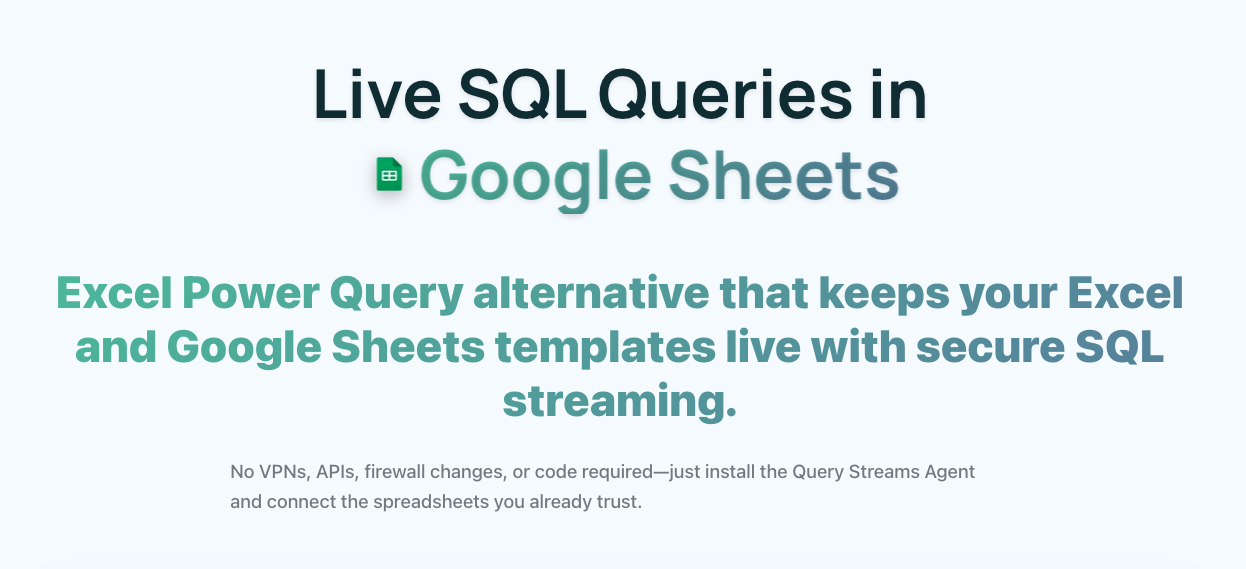
It's Monday morning, the board meeting is in two hours, and your boss needs the latest sales figures. The data exists in your database—it's always been there. But pulling it into a usable spreadsheet means fighting through manual exports, stale connections, and security protocols. By the time you have the numbers, the meeting has started.
This daily battle with data accessibility is what pushed me to investigate Query Streams, a platform promising to erase the friction between your databases and the spreadsheets your team actually relies on for decisions.
After weeks of testing across different scenarios, I found something notable: Query Streams doesn't merely connect databases to spreadsheets. It rethinks how data moves through an organization, tackling pain points I didn't even realize were solvable—real-time streaming, intelligent compression, and secure external sharing.
And you can start today on the free tier, with setup straightforward enough that you won't need your IT department. In this review, I'll cover my hands-on experience, real-world test results, and an honest verdict on whether Query Streams deserves a spot in your stack.
The Data Connectivity Crisis
Speaking with data analysts, finance professionals, and operations managers surfaced a consistent set of frustrations:
- The export-import treadmill: Teams waste hours downloading CSVs and re-importing them daily or weekly.
- Stale data syndrome: By the time data reaches decision-makers, it's already outdated.
- Security vs. accessibility: Organizations either lock data down so tight it's unusable, or compromise security to enable access.
- Spreadsheet sprawl: Conflicting versions of reports circulate, breeding mistrust.
- IT bottlenecks: Simple data requests wait on IT, causing delays.
- Remote-work reality: Traditional database connections weren't built for distributed teams.
Query Streams tackles these differently, focusing on seamless integration rather than replacing existing workflows.
Architecture and Approach
Query Streams operates on a fundamentally different philosophy than traditional data connectivity tools. Rather than forcing users into complex enterprise software, it meets them where they already work—in spreadsheets.
The platform creates a secure data pipeline through two key components:
- The Agent Layer: A lightweight Windows service that sits inside your network perimeter, maintaining database connections without requiring external access or firewall changes.
- The Client Interface: Native add-ins for Excel and Google Sheets that feel like natural extensions of familiar tools.
Rather than static snapshots, Query Streams establishes persistent connections that refresh on demand. Your spreadsheets become live windows into your databases. Connect once, write or select a query, and execute it directly in the spreadsheet—with the complexity of security and transfer handled transparently in the background.
Why Choose Query Streams?
- 🔄 Real-time data streaming: Live SQL data in Google Sheets or Excel without delays.
- 🔒 Secure query sharing: Share parameterized queries and dashboards without exposing SQL or credentials.
- ⚡ Parallel execution: Load multiple spreadsheet tabs simultaneously.
- 📉 80–90% data compression: Reduce bandwidth and speed up large transfers.
- 🛠️ No complex setup: Lightweight agent and cloud relay make deployment easy.
- 🌐 Cross-platform support: Works with both Excel and Google Sheets.
- 🔐 Enterprise security: No inbound firewall ports or VPN requirements.
Key Capabilities
Dynamic Data Connectivity
Rather than one-time pulls, Query Streams builds persistent channels you can activate whenever fresh data is needed. Database coverage is broad, spanning the major platforms organizations use:
- Enterprise databases: SQL Server, PostgreSQL.
- Open source: MySQL, MariaDB, SQLite.
- Desktop databases: Microsoft Access.
The refresh mechanism is elegant—update data with a single click, and the system manages query execution and transfer intelligently.
Collaborative Data Sharing
One of the most innovative aspects is controlled access to live data, solving the dilemma between risky credential sharing and outdated static exports:
- Parameterized queries: Dynamic filters users can control.
- Dropdown UIs: Business users get dropdowns instead of raw SQL.
- Credential protection: Database credentials never leave your network.
- Granular permissions: Control exactly what each user can access.
Parallel Execution Engine
A real technical achievement: loading multiple spreadsheet tabs at once. Traditional tools process sequentially, but Query Streams can:
- Load 5+ tabs simultaneously to cut total refresh time.
- Optimize resource usage to prevent database overload.
- Provide progress tracking on running queries.
- Isolate errors so one failing query doesn't block others.
Advanced Data Compression
Proprietary algorithms cut data transfer by 80–90%. That's not just about speed—it makes large-scale analysis practical over standard internet connections.
No-Code Setup Process
- Download the agent: Install the lightweight Windows service on any machine with database access.
- Configure connections: Add databases through the web interface.
- Install add-ins: Get the Excel or Google Sheets extensions.
- Start querying: Run live SQL immediately.
The whole process takes about 10 minutes, no network config or IT involvement needed.
Query Streams vs. Competitors
Here's how Query Streams compares with SeekWell, Coefficient, and enterprise solutions like Hightouch/Census.
Unique Capabilities
| Feature | Query Streams | SeekWell | Coefficient | Hightouch/Census |
|---|---|---|---|---|
| Parallel execution (5+ tabs) | ✅ Yes | ❌ No | ❌ No | ❌ No |
| Adaptive query compression | Agent compresses, add-in decompresses | Raw payloads | Raw CSV | Warehouse-dependent |
| Real-time streaming | Interactive | Scheduled/manual | Scheduled | Sync only |
| Secure query sharing | Governed external & internal | Internal only | Limited | For models |
| Parameterized external queries | ✅ Yes | ❌ No | ❌ No | ❌ No |
Spreadsheet Experience
| Feature | Query Streams | SeekWell | Coefficient | Hightouch/Census |
|---|---|---|---|---|
| Spreadsheet integration | Excel + Google Sheets | Excel + Google Sheets | Google Sheets + Excel | Limited |
| Parameterized UI (dropdowns) | Full | Basic | None | None |
| Built for teams & analysts | Teams & partners | Analysts only | Individuals | Data teams |
Security & Deployment
| Feature | Query Streams | SeekWell | Coefficient | Hightouch/Census |
|---|---|---|---|---|
| Works behind firewalls (no VPN) | Agent-based | ❌ No | ❌ No | ❌ No |
| Governance & egress control | Full | Basic | Limited | Enterprise |
| Broad database support | On-prem + cloud | Some | Cloud connectors | Warehouses only |
| External query sharing | Full invite system | Sheets only | Spreadsheet-only | API destinations |
| Credentials never exposed | Never | Internal only | Shared | Warehouse creds only |
What the comparison reveals: Query Streams holds a unique position. Parallel execution and adaptive compression are technical differentiators that directly boost productivity. No other solution offers external query sharing with full governance. Its agent-based architecture maintains security without sacrificing function, and the true spreadsheet-native experience makes it accessible to business users, not just analysts.
Implementation Experience
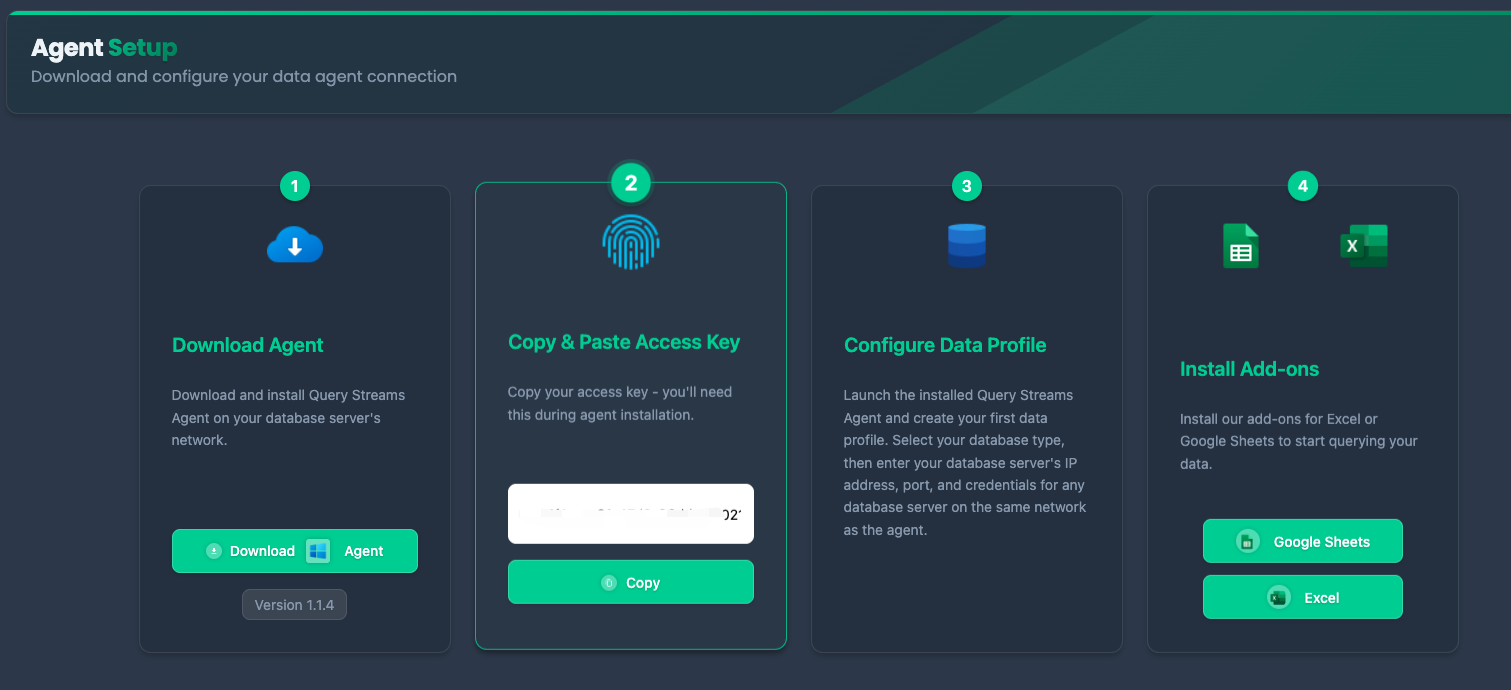
Setup differed markedly from other enterprise data tools. Rather than lengthy config and IT involvement, Query Streams prioritizes immediate usability.
Agent deployment: Download, run the installer, and the service starts automatically with minimal resource usage.
Database integration: Adding sources through the web interface is intuitive, with guided setup that validates connections in real time.
Access control: The permission system gives granular control over data-source access—crucial for governance.
Client integration: Excel and Google Sheets add-ins install in seconds and integrate seamlessly.
First Query Experience
Executing my first live query felt natural—write SQL in a familiar interface, click execute, watch data populate into cells. No intermediate steps, no file downloads. Error handling was clear and actionable when queries failed.
The Query Streams Dashboard
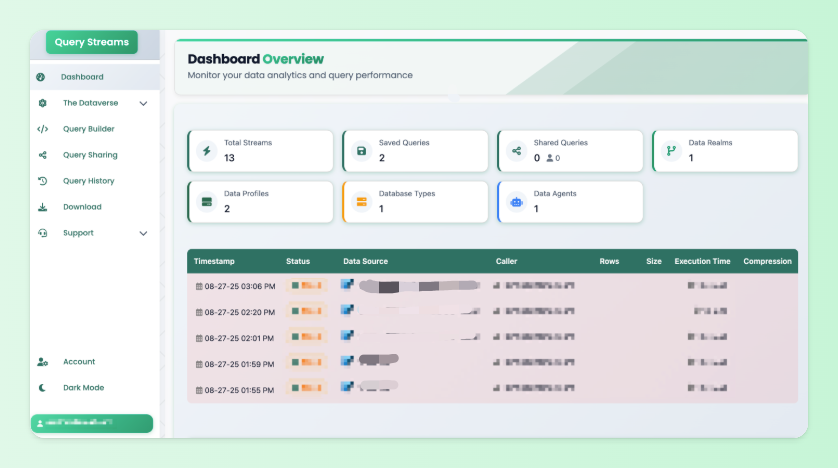
Beyond spreadsheets, a comprehensive web dashboard handles:
- Analytics Dashboard: Monitor query performance and usage.
- The Dataverse: Organize and explore available data sources.
- Query Builder: Create and refine SQL with syntax highlighting.
- Query Sharing: Collaborate with granular permissions.
- Query History: Review past queries and metrics.
- Download Center: Export data in various formats.
- Support Hub: Documentation and tutorials.
- Account Management: Users, permissions, and billing.
Practical Applications
- Financial reporting: Build dashboards pulling current revenue, expense, and cash-flow data directly, providing real-time financial positions instead of stale templates.
- Operational intelligence: Track KPIs across business units with metrics that update through the day, shifting from periodic to continuous monitoring.
- Sales analytics: Territory-specific dashboards let reps see only their own data while managers get comprehensive views.
- Customer data sharing: Give clients real-time access to their usage analytics without exposing other customers' data.
- Compliance and auditing: Let external reviewers run predefined queries without direct database access.
Performance Testing
- Simple aggregations: 2–5 seconds for datasets under 100K rows.
- Complex joins: 5–15 seconds for multi-table queries.
- Large datasets: 15–30 seconds for 500K+ rows.
- Compression: A 50MB result set compressed to ~8MB during transfer.
- Concurrency: No significant degradation with up to 10 concurrent users.
- Reliability: Zero unplanned downtime with proper deployment; the system handles network interruptions gracefully.
Pricing
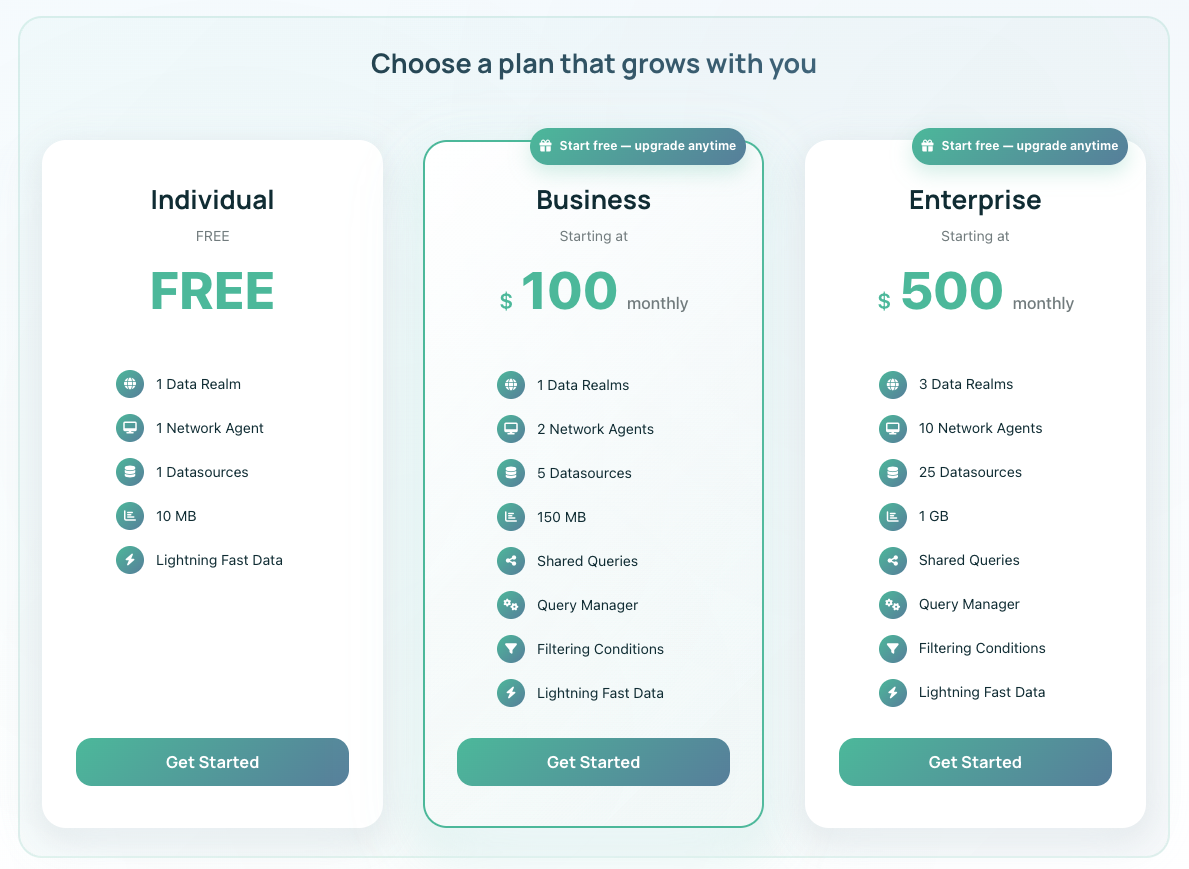
- Individual (Free): $0/month, 10 MB data processing. Good for individuals or testing.
- Business: From $100/month, 150 MB. Multiple Network Agents, enhanced sharing, team collaboration.
- Enterprise: From $500/month, 1 GB. Advanced security, priority support, custom integrations.
The free plan is genuinely useful, not a limited trial.
Honest Assessment
Where it excels:
- Deployment simplicity—operational within hours, not weeks.
- Security without complexity—solves the security/accessibility dilemma elegantly.
- Spreadsheet-native experience that feels natural.
- Bandwidth optimization for large datasets.
- Collaborative data access with live, parameterized queries.
Limitations:
- Windows-only agent may not suit all infrastructure.
- SQL skill required for custom queries.
- Scope boundaries—great at connectivity, not advanced analytics or modeling.
- Infrastructure requirements—needs direct database access.
Who Should Use Query Streams?
Great fit:
- SMBs and scale-ups living in spreadsheets needing safer, faster data access.
- Finance teams wanting trustworthy numbers without waiting on engineering.
- Operations teams needing real-time visibility.
- Data teams standardizing queries and escaping ad-hoc requests.
- Consulting firms sharing data securely with external clients.
Not ideal for:
- Pure Mac/Linux shops (until cross-platform support arrives).
- Complex BI needs—enterprise semantic layers or advanced dashboarding.
- Non-SQL environments—NoSQL or other non-relational databases.
Market Position
Query Streams sits apart from traditional BI tools (which create new silos), Excel Power Query (technical, no secure external sharing), direct database connections (complex, credential exposure), data exports (static snapshots), and cloud data platforms (heavy investment). It enhances existing workflows rather than replacing them, with an agent-based architecture that solves security and connectivity challenges, and a spreadsheet-native experience that eliminates context switching.
Final Verdict
After weeks of testing, Query Streams has earned a place on my recommended-tools list. It solves real, daily problems by making spreadsheet-based analytics more powerful and secure. The security model deserves particular praise—keeping credentials within the network perimeter while enabling external collaboration is a genuinely elegant answer to a hard problem.
It's ideal for organizations that rely on spreadsheets, need live external sharing, and value security without blocking productivity. It's less suited to Windows-free shops or teams needing advanced analytics.
Query Streams doesn't try to reinvent how you work with data—it just makes existing processes faster, safer, and more collaborative.
Review Summary
- Ease of Implementation: ⭐⭐⭐⭐⭐ (5/5)
- Feature Set: ⭐⭐⭐⭐½ (4.5/5)
- Performance: ⭐⭐⭐⭐ (4/5)
- Security Model: ⭐⭐⭐⭐⭐ (5/5)
- Platform Compatibility: ⭐⭐⭐⭐ (4/5)
- Value Proposition: ⭐⭐⭐⭐ (4/5)
Ready to try Query Streams? 👉 Learn More and start with the free plan.
Tags
# Review# Query Streams# Power Query alternative# Google Sheets SQL query# Excel SQL query# Real-time data streaming# Secure query sharing# Database for Google Sheets# Run SQL queries in Excel# Connect Excel to database# Connect Google Sheets to database# SQL data query in Excel# SQL data query in Google Sheets# Data compression# Parallel execution engine# Business intelligence tools# Data analytics# IT professionals# Finance tools# Logistics reporting# Retail analytics# Manufacturing dashboards# SaaS reporting# Professional servicesQuizBoost Review – The Invisible AI Study Assistant for Any Learning Platform
Optimly Review - The AI Brand Strategist That Fixes What ChatGPT Believes About You
Follow for new blogs
Subscribe to our blog
Subscribe to Newsletter
Subscribe to our newsletter to get the best products weekly.